Skip to content

deployment

Git File and Commit Operations: Managing Changes Between States

Introduction

Ever stared at your repo, wondering why a “small” change just won’t commit or push?

GUI tools like GitHub Desktop or VSCode extensions are convenient—but they hide the magic. When things go sideways, or when you need to carefully craft commits, stage parts of files, or undo a “tiny mistake” that isn’t obvious, the GUI often leaves you helpless.

Full CLI Git is where you gain real control. It’s the difference between:

  • Clicking buttons blindly and hoping everything works
  • Understanding exactly where each change lives (Working Directory, Index, HEAD, Remote) and moving it precisely

Even minor mistakes—like accidentally staging a debug log or overwriting a feature—can snowball into hours of frustration. By mastering the CLI, you can fix problems before they become disasters, cherry-pick changes, or sculpt your commit history like a pro.

Think of this guide as your toolkit: practical commands, clear flows between Git states, and actionable tips to tame your repo—even when the “small” fixes aren’t so small after all.

Macro Syntax Error

File: blog/posts/software-and-tools/dev/OSX/docker/mastering-docker-comprehensive-guide-efficient-container-management.md

Line 426 in Markdown file: unexpected '.'

Use `--format` to customize output (e.g., `{{.ID}}` for IDs):

Laravel PWA Integration Guide for Mobile Views

Introduction

Have you ever wanted to provide mobile views for your web applications without the hassle of native mobile app development?

Mergevsrebase

With the Laravel PWA package, you can effortlessly create mobile views for your Laravel application, catering to both Android and iOS users.

This documentation serves as a step-by-step guide to help you integrate the Laravel PWA package into your Laravel application effortlessly. Whether you're a seasoned developer or just starting your journey with Laravel, this guide will walk you through the process, making PWA implementation a breeze.

Logging for Deployment in Python: A Practical Guide to Effective Debugging and Monitoring

Introduction

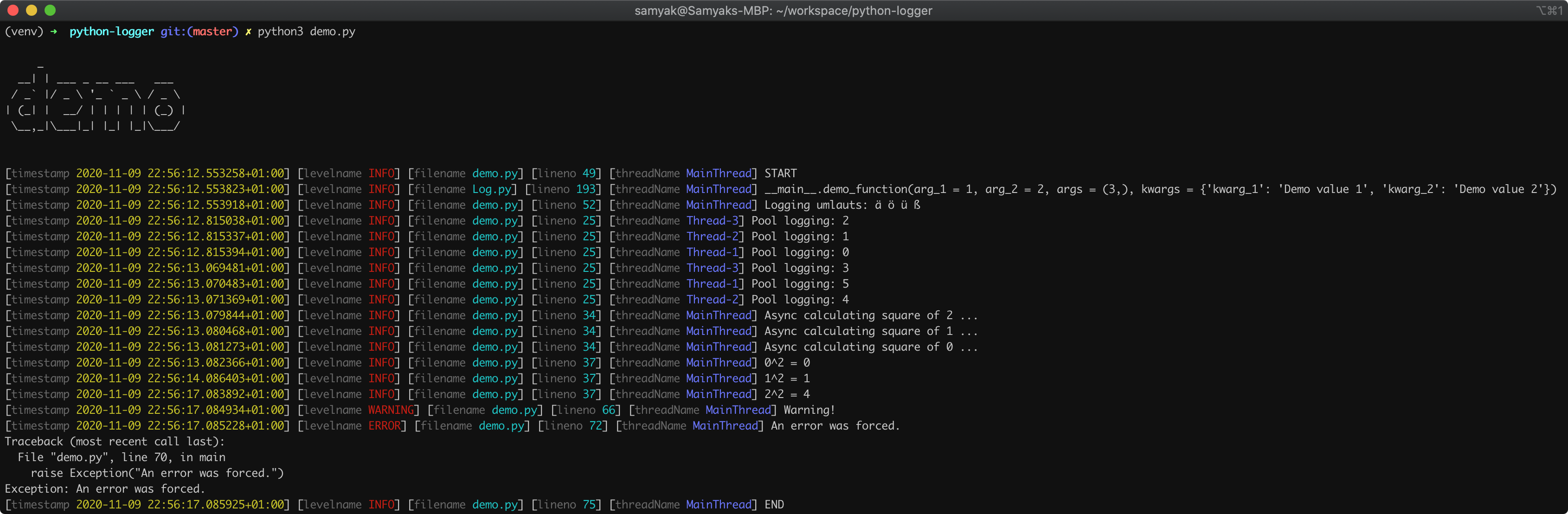
Are you still using print() statements for debugging in Python? Upgrade your logging game with Python's built-in logging module or the Loguru library!

If you're tired of scattered print statements cluttering your codebase, it's time to embrace the power of logging in Python. Whether you're a beginner or an experienced developer, mastering logging techniques is essential for effective debugging, monitoring, and troubleshooting of your Python applications.

logging-demo

Logging in Python allows you to set different levels of logging, such as DEBUG, INFO, WARNING, ERROR, and CRITICAL. With these levels, you can control the verbosity of log messages and focus on the information relevant to your current task.

Introduction

Imagine having a GitHub Pages website. Now, you've migrated to project on another GitHub Pages website. As reports surfaced about users being unable to access the site, the need for a swift redirection from old URLs to the current ones became paramount.

GitHub Invertocat Logo

The catch? The solution had to operate within the constraints of a static web page, using only HTML, CSS, and JavaScript.

While conventional methods like Flask and Frozen-Flask failed, the journey led to a creative solution using HTML and JavaScript. In this blog post, I'll share the step-by-step process of how I navigated through the obstacles and achieved seamless redirection.

Mastering Essential Linux Commands: Your Path to File and Directory Mastery

Introduction

This documentation aims to offer a comprehensive understanding of essential commands and techniques for file and directory management in a Linux environment. Mastering these commands is crucial for efficient navigation, manipulation, and analysis of files and directories.

We'll embark on a journey by delving into the foundational usage of key commands like wc, du, grep, awk, and find, uncovering their individual functionalities. Additionally, we'll explore how these commands can be combined using powerful methods such as pipes (|), -exec {} \;, or -exec {} +, unlocking their synergistic potential.

Moreover, to solidify your understanding, real-life examples showcasing practical applications will be demonstrated.

Setting Up Laravel Environment on Ubuntu

This guide will help you set up the necessary environment to run a Laravel application on an Ubuntu system.

So this document provides a step-by-step guide to set up Apache, PHP, MySQL/MariaDB, Composer, and phpMyAdmin for managing databases, while also ensuring MySQL root user password setup for a Laravel environment on Ubuntu.

Install Apache and PHP

  • Install Apache
sudo apt update 
sudo apt install apache2

How to deploy a Streamlit Application on Hugging Face

In this guide, we'll walk through the steps to deploy a Streamlit app using the Hugging Face platform. For demonstration purposes, we'll create an app that utilizes the Python module Pix2Tex. Users will be able to upload an image and get the corresponding LaTeX formula along with a rendered version.

Prerequisites

  1. Create a virtual environment:
python3 -m venv myenv
source myenv/bin/activate
python -m venv myenv
./myenv/Scripts/activate

Guide to Installing MySQL and Connecting to Databases

Introduction

MySQL is a popular relational database management system used for storing and managing data. To get started, you'll need to install MySQL, set it up, and then connect to databases. Here's a comprehensive guide to help you through the process.

Installation Process

To install MySQL, follow these steps:

  • update the package lists
sudo apt-get update
  • install MySQL
sudo apt-get install mysql-server

Deploying any Web application with Nginx: Example of Flask

Introduction

You have created your flask application. How nice ! Now, you want to go a step further and deploy it. For most hosting services, you have nice interfaces to deploy your python applications with support for flask. But sometimes, you only have access via ssh to the server.

This is a very straigthforward tutorial on how to do it.

This tutorial also applies to any web server you can run on local but want to deploy

Step 1: Install Nginx and Flask

Make sure you have Nginx and Flask installed on your server. If not, install them using the appropriate package manager for your operating system.

Step 2: Configure Nginx

Create a new Nginx configuration file for your Flask app in the /etc/nginx/sites-available/ directory. For example, you could name it myapp.conf. Edit the file and add the following configuration: