Skip to content

2024

Integrating Requirements.txt with Poetry

Managing dependencies is a crucial aspect of any software project. Whether you're starting a new project or inheriting an existing one, handling dependencies effectively can greatly impact your workflow. Often, projects utilize a requirements.txt file to specify their dependencies, but when it comes to Python projects, integrating these dependencies seamlessly with a package manager like Poetry can streamline the process.

So, when working with Poetry, you might need to integrate your existing requirements.txt file into your project so you can improve reusability and publishing. This document outlines how to achieve that efficiently.

Laravel PWA Integration Guide for Mobile Views

Introduction

Have you ever wanted to provide mobile views for your web applications without the hassle of native mobile app development?

Mergevsrebase

With the Laravel PWA package, you can effortlessly create mobile views for your Laravel application, catering to both Android and iOS users.

This documentation serves as a step-by-step guide to help you integrate the Laravel PWA package into your Laravel application effortlessly. Whether you're a seasoned developer or just starting your journey with Laravel, this guide will walk you through the process, making PWA implementation a breeze.

Exploring Python Code Formatters and Linters: black vs. flake8 vs. isort vs. autopep8 vs. yapf vs. pylint vs. ruff and more

Introduction

Are you struggling to maintain consistent formatting in your Python code? Do you find yourself spending too much time organizing imports or adjusting code style manually?

python-code-carbon

Navigating the landscape of Python code formatters and linters can be overwhelming, especially for beginners.

This guide serves as your roadmap to mastering Python code formatters and linters, simplifying the process and providing practical examples for effective code formatting, organization, and analysis.

Logging for Deployment in Python: A Practical Guide to Effective Debugging and Monitoring

Introduction

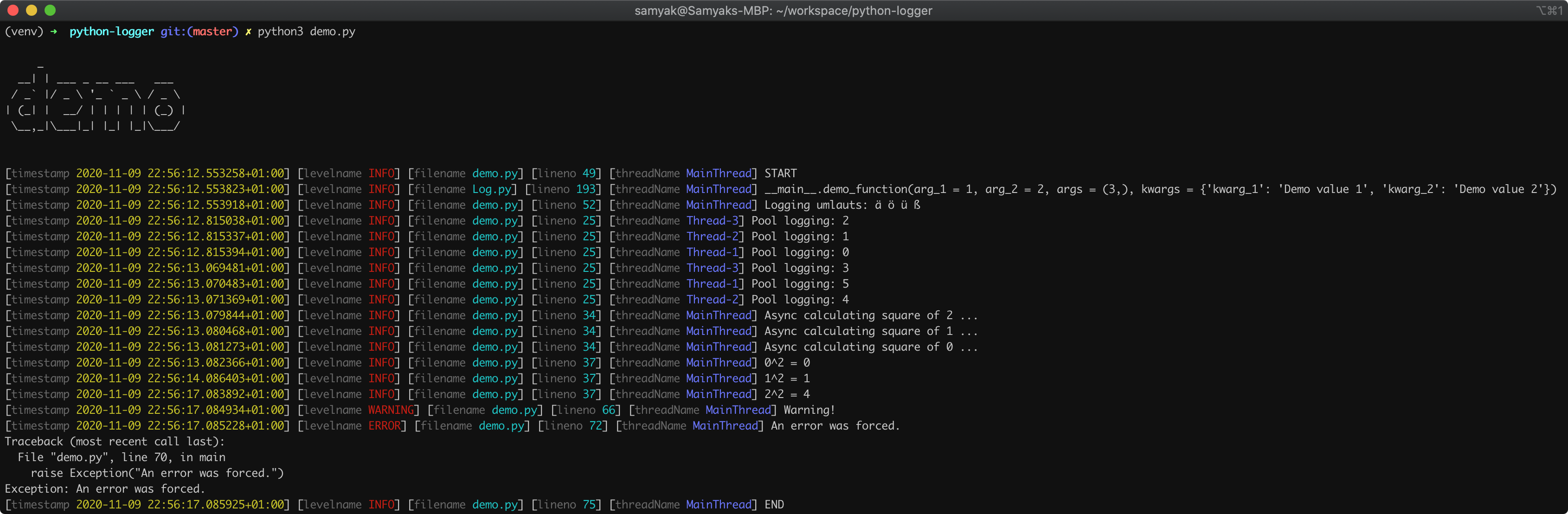
Are you still using print() statements for debugging in Python? Upgrade your logging game with Python's built-in logging module or the Loguru library!

If you're tired of scattered print statements cluttering your codebase, it's time to embrace the power of logging in Python. Whether you're a beginner or an experienced developer, mastering logging techniques is essential for effective debugging, monitoring, and troubleshooting of your Python applications.

logging-demo

Logging in Python allows you to set different levels of logging, such as DEBUG, INFO, WARNING, ERROR, and CRITICAL. With these levels, you can control the verbosity of log messages and focus on the information relevant to your current task.

Managing Python Projects with Poetry

python-poetry

Poetry simplifies Python project management and dependency handling. It's beginner-friendly and offers advantages like streamlined dependency management, integrated virtual environments, and simplified workflow. Give it a try to experience efficient Python development.

Follow these steps to initialize, add dependencies, and manage your project effortlessly:

1. Install Poetry

If Poetry is not installed, use the following command:

pip install poetry

Introduction

Imagine having a GitHub Pages website. Now, you've migrated to project on another GitHub Pages website. As reports surfaced about users being unable to access the site, the need for a swift redirection from old URLs to the current ones became paramount.

GitHub Invertocat Logo

The catch? The solution had to operate within the constraints of a static web page, using only HTML, CSS, and JavaScript.

While conventional methods like Flask and Frozen-Flask failed, the journey led to a creative solution using HTML and JavaScript. In this blog post, I'll share the step-by-step process of how I navigated through the obstacles and achieved seamless redirection.

Simplifying Large File Management in Git with Git LFS

Introduction

Introduction

Have you ever faced the challenge of managing large files within a Git repository?

git-lfs-logo

Whether you're an experienced developer or just beginning your coding journey, dealing with large files in version control can be perplexing. Often, developers resort to .gitignore to exclude files, but what if there are essential large files crucial for your project's integrity?

Enter Git LFS (Large File Storage), a solution designed to revolutionize how Git repositories handle large files. While some files are pivotal to track, keeping repositories lean and efficient remains a priority.

Evolution of a Project: From Python Apps to a Web Interface

How a solo coder turned a repo full of data scripts into a full-stack web app with beautiful interface in one day ?

In the world of development, projects tend to evolve, morphing and reshaping themselves to meet ever-changing needs and preferences. What starts as a collection of Python applications can transform into something entirely different—a cohesive web interface with a backend to match.

This evolution was made possible by harnessing a comprehensive tech stack, blending various cutting-edge technologies:

  • Python: Served as the foundational language for backend logic and functionality.
  • FastAPI: Empowered the backend with rapid server capabilities and smooth API integration.
  • Next.js: Spearheaded the frontend development, providing dynamic and responsive user interfaces.
  • Prisma: Efficiently managed databases, optimizing data operations and queries.
  • Clerk: Handled authentication and user management, ensuring secure and streamlined user experiences.
  • Docker: Ensured modern development practices and facilitated seamless execution across various environments.