A Beginner's Guide to gRPC with Python
Introduction to gRPC
Have you heard of gRPC, high-performance, open-source framework that allows developers to build distributed systems and microservices ?
gPRC uses protocol buffers as its interface definition language and provides features such as bi-directional streaming and flow control.
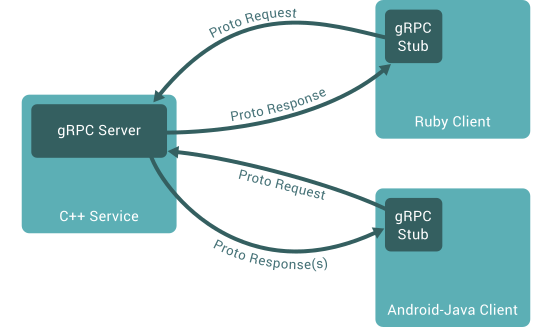
In this blog post, we will explore how to get started with gRPC in Python using the official gRPC Python library. We will walk through a simple working example that demonstrates how to:
- Define a service in a
.protofile - Generate server and client code using the protocol buffer compiler
- Use the Python gRPC API to write a simple client and server for your service
Advantages of gRPC
gRPC offers several advantages, making it a versatile and efficient choice for building distributed systems and microservices:
- Language Independence: gRPC supports multiple languages seamlessly, allowing developers to build distributed systems using their preferred programming language.
- Open Source & Multilingual Support: Being open source, gRPC enjoys support across various programming languages, making it a widely adopted solution for building distributed systems.
- Boilerplate Elimination: gRPC generates code, reducing the need for boilerplate code and simplifying the development process.
- Efficient Data Encoding: gRPC utilizes buffers instead of JSON for data encoding, resulting in lighter data transmission.
Getting Started with gRPC in Python
Quick Setup
Follow the steps below to set up a Python environment for gRPC 1:
- Quick Setup:
cd path/to/my/folder
python -m venv .venv
source .venv/bin/activate
python -m pip install --upgrade pip
- Install gRPC and gRPC Tools:
- gRPC Tools Include:
protoc, the buffer compiler- A plugin to generate client and server-side code from
.protofiles.
Testing an Example
Clone the gRPC repository to access a sample project:
Run the server in one terminal:
The output
Run the client in another:
Congratulations! You've run your first gRPC application!
What the code does
The provided code includes a Protocol Buffers (protobuf) definition, a server-side implementation in Python, and a client-side implementation in Python. The protobuf definition defines a Greeter service with three RPC methods: SayHello, and SayHelloStreamReply. The server-side implementation defines the behavior of the SayHello method, while the client-side implementation makes use of these methods to communicate with the server.
The helloworld.proto file defines the Greeter service with three RPC methods. The greeter_server.py file implements the server for the Greeter service, and the greeter_client.py file implements the client to communicate with the server. The python -m grpc_tools.protoc command is used to compile the .proto file and generate the necessary Python code for the server and client.
Adding an Extra Method on the Server
- Modify
../../protos/helloworld.proto(grpc/examples/protos/helloworld.proto) and the filesgreeter_server.pyandgreeter_client.pyin theexamples/python/helloworldfolder.
...
def run():
with grpc.insecure_channel('localhost:50051') as channel:
stub = helloworld_pb2_grpc.GreeterStub(channel)
response = stub.SayHello(helloworld_pb2.HelloRequest(name='you'))
print("Greeter client received: " + response.message)
response = stub.SayHelloAgain(helloworld_pb2.HelloRequest(name='you'))
print("Greeter client received: " + response.message)
...
- Compile the
.protofile and generate the necessary Python code for the server and client
python -m grpc_tools.protoc -I../../protos --python_out=. --pyi_out=. --grpc_python_out=. ../../protos/helloworld.proto
- Run the client and server again:
What just happened
Well, we have added another RPC method, called here SayHelloAgain. The implementation includes:
- The protobuf definition in the
Greeterservice in thegreeter_server.py - The server-side implementation in
greeter_server.py
So, when running the server then the client, we should receive two responses
The server output should remain the same
But the client will receive two responses from the server.
Will try to greet world ...
Greeter client received: Hello, you!
Greeter client received: Hello again, you!
The python -m grpc_tools.protoc command is used to compile the .proto file and generate the necessary Python code for the server and client. This command takes the following arguments:
-I../../protos: Specifies the directory containing the.protofile.--python_out=.: Specifies the output directory for the generated Python code.--grpc_python_out=.: Specifies the output directory for the generated gRPC Python code.
This command generates the helloworld_pb2.py file, which contains the generated request and response classes, and the helloworld_pb2_grpc.py file, which contains the generated server and client stubs.
The python -m grpc_tools.protoc command is the recommended way to generate Python code from a .proto file for use with gRPC.
For more information, you can refer to the gRPC Python documentation and the Protocol Buffer Basics: Python tutorial.
If you need to compile .proto files for other programming languages, the process may differ, and you can refer to the respective language's gRPC documentation for guidance.
Further Reading
- Introduction to gRPC
- gRPC Core Concepts
- Explore the Python API Reference to discover functions and classes.
For more detailed instructions, refer to the gRPC Python Quickstart 1.